Hotpaths for AutoCAD
Test your AutoCAD tools once. Rerun the test with one click.
Do the test by hand while Hotpaths records it. You get a step-by-step test script with screenshots and every dialog value you changed. Click Run test later and Hotpaths does it all again, then tells you PASS or FAIL.
Your key:
- Download Hotpaths (AutoCAD 2026, Windows)
- Close AutoCAD, unzip, and run
Install Hotpaths.cmd. Say yes when it offers to add Hotpaths to AutoCAD's Trusted Locations, so AutoCAD loads it without a security question at every start. - Start AutoCAD. On the Hotpaths tab click License and paste your key.
We'll email you about Hotpaths now and then; reply "stop" any time.
Free: every feature, 3 actions a day (record, run or build the guide). No card needed. Saved tests are unlimited; upgrade to unlimited use any time for $99, same key.
- 1 Record
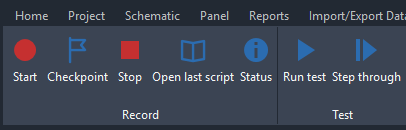 Click Start, do your test by hand.
- 2 ScriptStep 3 A dialog opens: Draw gridWritten for you, with a screenshot per step.
Set Columns to5(was4)
Set Spacing to20(was10.00) - 3 Replay
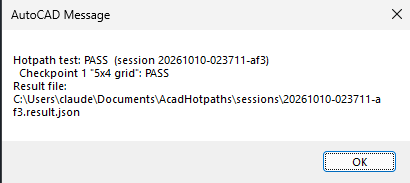 One click. PASS or FAIL.
- Real recordings, no mockups
- AutoCAD 2026 on Windows
- Tests stay on your PC (only the license check goes online)
- Scripts in Word, Excel or Markdown
Who it's for
Demo: a real test, start to finish
This test draws a line, then opens a Draw grid dialog, changes two values and picks a point. Here is what Hotpaths did with it.
Record: click Start and do your test
Hotpaths adds a ribbon tab. Click Start, do the work as usual, add a Checkpoint for anything worth checking, then click Stop.
Hotpaths sees what you changed in each dialog
It takes a picture of the dialog as it opened and again before you pressed OK, and writes down only the values you changed.
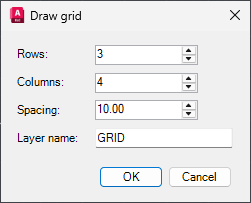
Before 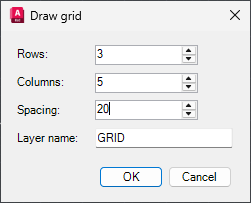
After In the script this becomes:
A dialog opens: Draw grid. Make these changes, then confirm:- Set Columns to
5(was4) - Set Spacing to
20(was10.00)
- Set Columns to
You get a test script anyone can follow
When you click Stop, Hotpaths writes Test steps: numbered steps, the ribbon button or command for each, every point picked, and a screenshot of each step. Optionally also as Word and Excel files, with a PASS/FAIL column for testers.
Run it again with one click
Click Run test and pick the test. Hotpaths opens a new drawing, clicks the same ribbon buttons, types the same commands and points, fills each dialog with the recorded values and presses OK. At the end it checks every checkpoint and shows the verdict.
The verdict from a run of a similar grid test with one checkpoint. Every run is saved with its date and verdict.
Hotpaths for AutoCAD
One-time payment, per user. Unlimited use.
- The Hotpaths plugin for AutoCAD 2026 (Windows), installed as a normal AutoCAD app bundle
- Record, replay with automatic dialog filling, and step-through mode
- Test scripts in Markdown, plus Word and Excel export
- A test browser in AutoCAD: open any test's script, screenshots and results, or run it
- Email support from the developer
The button opens an email to [email protected]. Send it and we reply with payment details and the download. Not sure it fits your setup? Ask first.
Questions
Which AutoCAD versions does it work with?
AutoCAD 2026 on Windows. It is tested on AutoCAD Electrical 2026. Other AutoCAD 2026 products load the same plugin; if you use one, tell us before you buy and we'll confirm.
Does it work with our own commands, ribbons and dialogs?
Yes, that's what it is for. It records ribbon clicks, typed commands, prompts and points from any command. Reading and filling dialog values is tested on standard Windows and WinForms dialogs; WPF dialogs are read through UI Automation. If a dialog can't be filled, the replay waits and tells you which values to enter.
Is there a free version?
Yes. The free version has every feature and allows 3 actions a day (record a test, run a test or build the guide); saved tests are unlimited. The count resets every day at 00:00 UTC. Upgrade to unlimited for $99; your key stays the same.
Does anything leave my PC?
Your tests don't: recordings, screenshots, scripts and results are files in your Documents folder. The only thing Hotpaths sends is the license check (your key, a PC ID that can't be traced back to the machine, the PC name and the plugin version), about once a month, and, on the free version only, a daily-limit check each time you record, run a test or build the guide (your key, the PC ID and which of the three it was). Paid works without internet until the license is due for renewal; the free version needs internet to count its actions.
Can testers without Hotpaths use the scripts?
Yes. The test script is a normal Markdown, Word or Excel file with the screenshots. Anyone can follow it by hand.
How do I pay?
Click the buy button and send the email. We reply with payment details. If you already have a free key, it becomes unlimited once paid; nothing to reinstall.